Product tour
One extension, from detection to audit.
InputGuard runs in the browser on the AI sites you protect. Follow this browser-native AI DLP flow end to end — what it detects, how it decides, how you deploy it, and what the audit trail keeps.
Free for individuals • per-device pricing for organizations
Detect
Find the data that actually causes problems.
Detection runs on the device against three categories, at every point data can leave an AI workflow. You decide which categories matter on each site.
Deploy failed again — here's the prod key AKIA…EXAMPLE. Ping me at jordan@acme.com or (415) 555-0148 once the Project Atlas migration is unblocked.
Credentials & secrets
API keys, access tokens, private keys, and password-like strings.
Personal data (PII)
SSNs, payment card numbers, emails, phone numbers, and bank details.
Business-sensitive terms
Your own keywords — project names, customer identifiers, contract language.
On paste
Scanned the instant it lands in an AI tool — before it becomes part of a prompt.
On submit
Final prompt text is checked at send time, with the person in the loop.
On attachment
Supported text files (TXT, CSV, JSON, Markdown, logs) are read in the extension.
Decide
One detection, four ways to respond.
Policy decides how InputGuard reacts — tuned per site, from a light review to a hard block. Here's exactly what each level looks like to the person at the keyboard.
Review
InputGuard surfaces exactly what was detected and lets the person decide in the moment — send as-is, send redacted, or cancel. They stay aware of the risk without losing their flow.
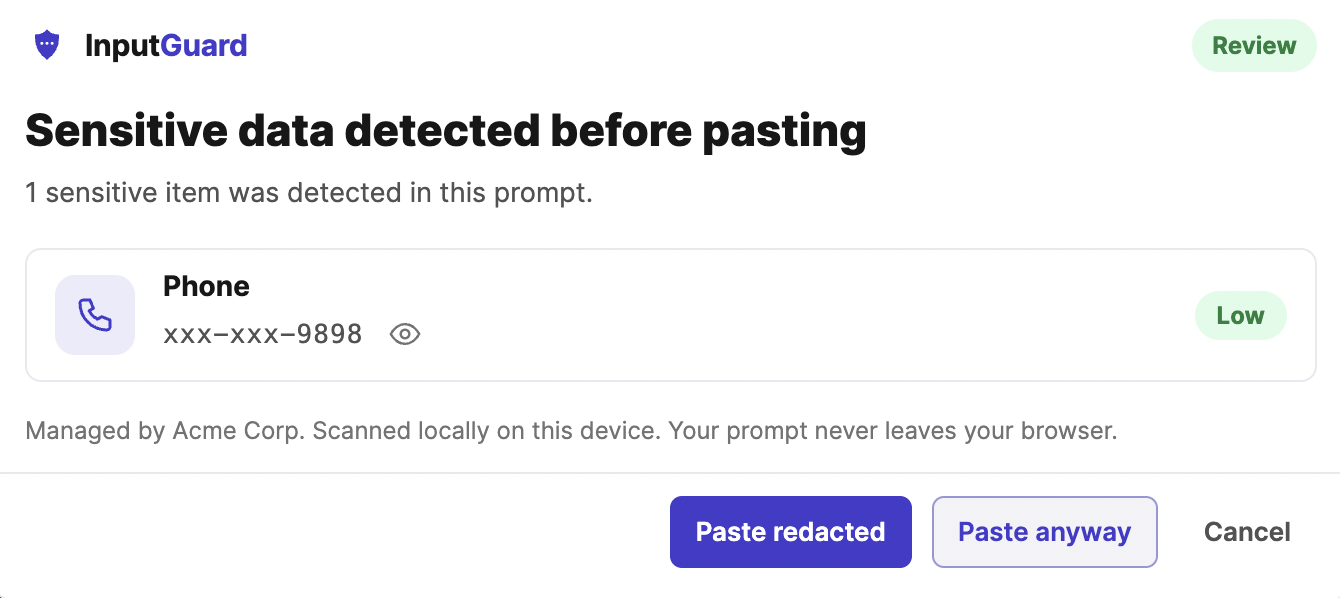
When to use Lowest-friction enforcement, for sites and categories where awareness is enough and you trust people to make the call.
Data categories
Switch on the categories that matter.
Every response level draws from one policy. Turn categories on or off and set how strict each one is — then open the full editor to fine-tune.
Identity
- SSN
- Phone
Financial
- Credit cards
- Bank accounts
Secrets & credentials
- API keys
- Passwords
- Private keys
Business sensitive
- Contracts
- Customer lists
- Internal terms
Deploy
Roll it out the way your team works.
The same extension runs for one person or a whole fleet. One panel governs browser-native DLP behavior; clear states decide which AI sites it touches.
Protection on or off
Turn scanning on or off for everyone on the policy.
Paste protection
Scan pasted text before it ever enters an AI tool.
Prompt scan
Check the final prompt locally when you send — prompt text is never stored or uploaded.
Text file attachments
Read and scan supported files — TXT, CSV, JSON, Markdown, and logs — before submit.
Supported-site scope
InputGuard protects the supported AI tools you enable and ignores everything else.
AI site controls
Decide how each AI site is treated.
Choose which supported AI tools InputGuard protects. Data Loss Prevention for AI tools applies where you turn it on, and unsupported sites are ignored.
- ProtectedSupported AI tools where detection and policy actively apply.
- OffTurn a supported tool off and InputGuard leaves it alone.
- UnsupportedSites InputGuard does not support are ignored.
Audit
See what happened — without reading prompts.
Organizations get a dashboard of activity built from metadata alone: sites, categories, counts, and outcomes. The prompt content stays on the device.
Dashboard
Last 7 days · metadata only
Protected devices
248
+12 this week
Events · 7 days
1,204
metadata only
Redactions
318
values stripped
Events this week
Outcomes
- Redacted318
- Warned204
- Blocked57
- Allowed625
- Protected-device inventory and enrollment
- Events and redaction counts over time
- Outcome breakdown — reviewed, redacted, blocked, allowed
- Per-site and per-category activity
Coverage
Supported AI applications
InputGuard protects the AI applications your team already uses.
ChatGPT
Claude
Google Gemini
Perplexity
Microsoft Copilot
Grok
DeepSeek
Qwen Chat
Kimi
Mistral Le Chat
Poe
Lovable
Additional AI applications are added regularly.
Don’t see an application you need? Contact us and we’ll prioritize adding it.
See it work on the sites your team already uses.
Add it to Chrome now, then expand to your organization when you're ready.
Free for individuals • per-device pricing for organizations